
Understanding the PTU WordPress Plugin
The Post Types Unlimited (PTU) plugin is an intuitive tool that enables you to incorporate custom post types and taxonomies into your WordPress website effortlessly. Unlike other plugins that may be heavy and filled with upsells, PTU offers a streamlined and straightforward experience. This plugin is particularly beneficial for sites requiring specialized content types and taxonomies, such as portfolios, testimonials, or event listings. Its user-friendly interface allows even newcomers to WordPress to navigate its features with ease, making it a popular choice among both seasoned developers and beginners alike.
Why Customize PTU Options?
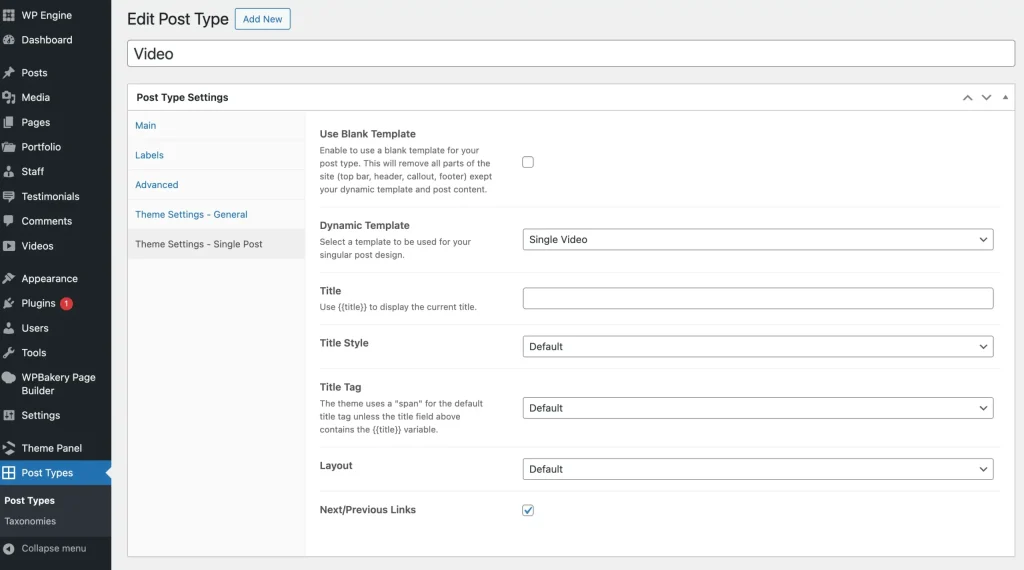
If you’re a theme developer, you might wonder about the benefits of adding custom options to the PTU plugin. Customizing these options can significantly enhance user experience by providing additional control over the design and functionality of custom post types and taxonomies. A great example of this is the Total Theme, which integrates easily with PTU to offer extensive customization options. This integration allows developers to tailor their themes to meet specific client needs, making them more appealing and functional.
Benefits of Custom Options
- Blank Template Use: Enable users to choose a blank template for posts, allowing them to start from scratch.
- Dynamic Templates: Allow selection of pre-designed templates for single posts, speeding up the design process.
- Title Customization: Modify default title text and style for single post pages, ensuring consistency with branding.
- Layout Selection: Choose from different layouts like full-screen or sidebar options, catering to diverse content presentation needs.
- Navigation Links: Enable next/previous post links for added navigation ease, improving user experience and engagement.
These options empower users, particularly those without coding expertise, to create more customized and advanced websites. By providing intuitive tools for customization, PTU encourages creativity and personalization, enabling users to truly make their sites unique. You might also enjoy our guide on Exciting WordPress Updates and Black Friday Deals You Can’t .
How Does Post Types Unlimited Work?
PTU operates using core WordPress functionalities, where custom post types and taxonomies are treated as post types themselves, managed through custom metaboxes. This plugin saves registered custom post types in a special post type called ptu and custom taxonomies in ptu_tax. This systematic approach not only keeps everything organized but also ensures that users can easily manage their content types without confusion.
Retrieving Post Types and Taxonomies
You can retrieve custom post types and taxonomies using these functions: (WordPress Plugin Developer Handbook). Understanding how to effectively use these functions can significantly simplify your content management process.
\PTU\PostTypes::get_registered_items()– Returns an array of post types.\PTU\Taxonomies::get_registered_items()– Returns an array of registered taxonomies.
Accessing Post Type or Taxonomy Settings
Settings for post types and taxonomies are stored as custom fields within metaboxes. To access these settings, use the get_post_meta() function, ensuring the _ptu_ prefix is included:
// Get a specific setting value
get_post_meta('post_type_name', '_ptu_{option_id}', true);
get_post_meta('taxonomy_name', '_ptu_{option_id}', true);
Adding Custom Options to PTU
Adding options is straightforward by creating new tabs in the default metabox. You can enhance both post type and taxonomy screens by hooking into ptu/posttypes/meta_box_tabs and ptu/taxonomies/meta_box_tabs filters. This flexibility allows developers to integrate specific functionalities that align with their project requirements or client expectations.
Example: Adding Custom Tabs
Below is an example code to add a “Cool Theme Settings” tab with custom options:
function wpexplorer_add_ptu_type_tabs(array $tabs): array {
    $tabs[] = [
        'id' => 'themename_settings',
        'title' => esc_html__('Cool Theme Settings', 'themename'),
        'fields' => [
            [
                'name' => esc_html__('Check Option', 'themename'),
                'id' => 'check_option',
                'type' => 'checkbox',
            ],
            [
                'name' => esc_html__('Text Option', 'themename'),
                'id' => 'text_option',
                'type' => 'text',
            ],
            [
                'name' => esc_html__('Custom Select Option', 'themename'),
                'id' => 'select_option',
                'type' => 'select',
                'choices' => [
                    '' => esc_html__('- Select -', 'themename'),
                    'option_1' => esc_html__('Option 1', 'themename'),
                    'option_2' => esc_html__('Option 2', 'themename'),
                    'option_3' => esc_html__('Option 3', 'themename'),
                ],
            ],
            [
                'name' => esc_html__('Image Select Option', 'themename'),
                'id' => 'image_size_option',
                'type' => 'image_size',
            ],
        ],
    ];
    return $tabs;
}
add_filter('ptu/posttypes/meta_box_tabs', 'wpexplorer_add_ptu_type_tabs');
add_filter('ptu/taxonomies/meta_box_tabs', 'wpexplorer_add_ptu_type_tabs');
This example demonstrates how easy it’s to expand the functionality of the PTU plugin. By adding custom tabs, developers can ensure users have access to specific settings that enhance their use of the plugin, ultimately leading to a more satisfying experience. For more tips, check out Build Your Own Branded Mobile App.
Conclusion
By understanding and working with the PTU plugin’s capabilities, you can significantly enhance the functionality and user-friendliness of your WordPress site. Adding custom options not only empowers users but also streamlines the design process for developers, creating a more reliable and interactive website experience. The flexibility offered by PTU means that developers can tailor their solutions to fit various needs, ensuring that every website remains unique and engaging. (Google Web.dev)